
Geo targeting ads deliver your message to people based on where they are, or where they show interest in. You choose countries, regions, cities, ZIP codes or a radius around an address, and the ad platform serves your campaign only there. Done well, it cuts wasted spend and makes your message feel local. Done badly, it quietly burns budget on clicks you can never convert.
This guide covers how geo targeting works, the settings that cost advertisers the most money, how it differs from geofencing and geoframing, the privacy rules you need to respect, and how to use it when you enter a new market.
TL;DR
- Geo targeting ads limit delivery to the locations you pick: countries, cities, postal codes or a radius around a point.
- In Google Ads, the default setting reaches people who show interest in a location, not only people in it. Local service businesses should switch to presence targeting.
- Location data is regulated. The FTC has acted against companies that used sensitive location data without proper consent.
- Targeting the right place is only half of it. In a new market, the creative, language and brand must fit the place too.
Table of Contents
- What geo targeting ads actually do
- Geo targeting, geofencing and geoframing: the differences
- The setting that wastes the most budget
- Radius targeting: what it can and cannot do
- Can Meta ads be geo-targeted?
- Privacy and legal rules for geo targeting
- Geo targeting when you enter a new market
- Perspective: why targeting without brand fit fails
- A step-by-step setup checklist
- Common mistakes to avoid
- Where MS Nordic fits
- FAQ
- Sources
What geo targeting ads actually do
Geo targeting is a form of location-based advertising. Instead of showing one campaign to everyone, you tell the platform which places matter. The platform then matches your ad to users using signals such as device location, IP address, and the places a user searches for or has shown interest in.
The unit you target can be very broad or fairly narrow:
- Country or region. Useful for export, market entry and language-specific campaigns.
- City or metro area. The usual choice for retail, services and events.
- Postal code. Good for door-to-door logistics, delivery zones and franchise territories.
- Radius around a point. A store, an office, a trade show venue.
- Exclusions. Places where you do not want to show, such as areas you do not ship to.
Geo targeting also does more than filter. Because location correlates with language, climate, culture, shipping time, price tolerance and competitors, it lets you run different messages in different places. That is where the strategic value sits, and where most accounts stop short.
Geo targeting, geofencing and geoframing: the differences
The three terms get mixed up constantly, and the confusion leads to bad briefs.
| Approach | What it does | Typical use |
|---|---|---|
| Geo targeting | Reaches people in or interested in a defined area, often combined with other signals | Regional campaigns, market entry, local services |
| Geofencing | Draws a virtual perimeter and triggers ads in real time when a device enters it | Event promotion, store-visit offers, trade show footfall |
| Geoframing | Uses historical location data to reach devices that were at a place earlier | Re-engaging visitors after an event or store visit |
One explainer frames the key difference this way: geofencing simply draws a perimeter, while geotargeting is a more strategic layer that blends location with behavioral, demographic and interest signals.
Geoframing is the least known of the three. According to one provider’s guide, it can reach mobile advertising IDs that were at a location up to six months earlier. That makes it possible to follow up with people who attended a trade show, something real-time geofencing cannot do. Treat it as a specialist tactic and check the consent basis for the data behind it before you buy.
The setting that wastes the most budget
If you run Google Ads, check one thing before anything else: the location option.
By default, campaigns use “Presence or interest”. That reaches people physically in your target area and also people elsewhere who search for or show interest in it. For a hotel, a university recruiting abroad or a real estate agency, that is often what you want. For a plumber or dentist, it is not.
Google’s own guidance and experts agree on the logic: businesses that serve customers on site should use “Presence”, while “Presence or interest” fits businesses where people plan from a distance, such as tourism, real estate and schools that recruit outside their home region. Leaving the default in place is one of the most common and costly geo targeting mistakes.
A quick rule of thumb:
- Does the customer have to be in the area to buy? Choose Presence.
- Do customers research from far away, then travel or relocate? Choose Presence or interest.
- Are you unsure? Start with Presence, then widen once you see search term and location reports.
Also review your exclusions. Geo exclusions work the same way as targets: you can actively exclude cities you do not serve, or ZIP codes where cost per lead is chronically poor. One agency write-up on common geographic targeting mistakes makes the same point about exclusions being as important as inclusions.
Radius targeting: what it can and cannot do
Radius targeting sounds precise. It is less precise than most advertisers assume.
Google enforces a minimum radius of 1 km (0.62 miles). This is a privacy mechanism based on minimum user thresholds, not a software limitation, so you cannot shrink it further. If you want to reach people on a single block or in one building, a radius will not do it.
What to do instead:
- Use a 1 km radius around a venue and combine it with an ad schedule matched to opening hours or event days.
- Add a location-specific message so that people outside your intended audience self-select out.
- Use a landing page that states the address and area served, so poor-fit clicks bounce quickly.
The two largest ad platforms also treat “nearby” differently. One comparison of radius targeting on both platforms notes that each weighs physical presence against shown interest, but they resolve the tension in different ways. In practice, that means a campaign copied from one platform to the other can behave very differently. Always check the location options screen in each, and do not assume the labels mean the same thing.
Can Meta ads be geo-targeted?
Yes. Meta’s Ads Manager lets advertisers show ads to people in specific geographic areas, using countries, regions, cities and radius options, and it explains these options in its location targeting help page. Social targeting leans more on profile and device signals than on search intent, so the creative has to work harder. A person scrolling a feed has not asked for your service, which means a local reference in the first line of copy or the first frame of a video does a lot of the work.
Privacy and legal rules for geo targeting
Is geotargeting legal? In general, yes. Showing an ad based on a country or city is routine. The risk grows with precision and sensitivity.
In the US, the FTC has repeatedly taken action against companies that collected and shared sensitive location data, such as visits to health care facilities or places of worship, without informed consent. Its business guidance describes remedies that can include destroying data and limiting its use, and programs that prevent targeting of sensitive location categories.
Outside the US the rules differ, and you should not assume one country’s rules apply everywhere. In the UK, for example, the Information Commissioner’s Office says contextual advertising, which targets by the content of a page instead of a personal profile, reduces legal complexity because it processes less personal data. The ICO also has specific guidance on location data under PECR.
There is a trust side too. In UK citizens’ juries run for the ICO, participants broadly accepted ads based on general regional data, but found granular data such as a town, borough or full postcode intrusive without explicit consent. That is a useful instinct for any market: the more precise the targeting, the more the audience expects to have agreed to it.
Practical checks before launch:
- Ask your data or media vendor where location data comes from and how consent was collected.
- Avoid targeting around sensitive places such as clinics, places of worship or shelters.
- Keep copy that references location friendly, not creepy. “Open near you” works. “We saw you at 5th Street” does not.
- If you serve several countries, have counsel confirm the rules in each. This article is not legal advice.
Geo targeting when you enter a new market
This is where the keyword gets strategic. For a brand expanding abroad, geo targeting is not just a way to avoid wasted clicks. It is how you test a market before committing fully.
A published case study from an ad-tech vendor shows a structured approach. A travel company expanded across 21 markets in a year using a three-stage creative strategy: gather foundational data with display ads, test multi-language creatives to find high-performing regional segments, then scale with interactive formats. It is a vendor’s own case, so treat the results as an illustration of method, not a promise. The sequence is still sound:
- Learn. Start with a limited geography and a modest budget. Collect search terms, conversion rates and cost per acquisition by region.
- Localize. Test creative in the local language against your original. Do not assume a literal translation will win.
- Scale. Once a region proves itself, widen the geography and move budget there.
Geo targeting only gives you the audience. What that audience sees decides the result. A campaign aimed at Madrid that uses a headline built for Copenhagen will reach the right people and still miss. Tone, humor, price framing, trust signals, payment options and even color associations vary by market. If you are planning to sell in Spain specifically, our notes on localization strategy before you launch and Spanish market entry for foreign brands go deeper.
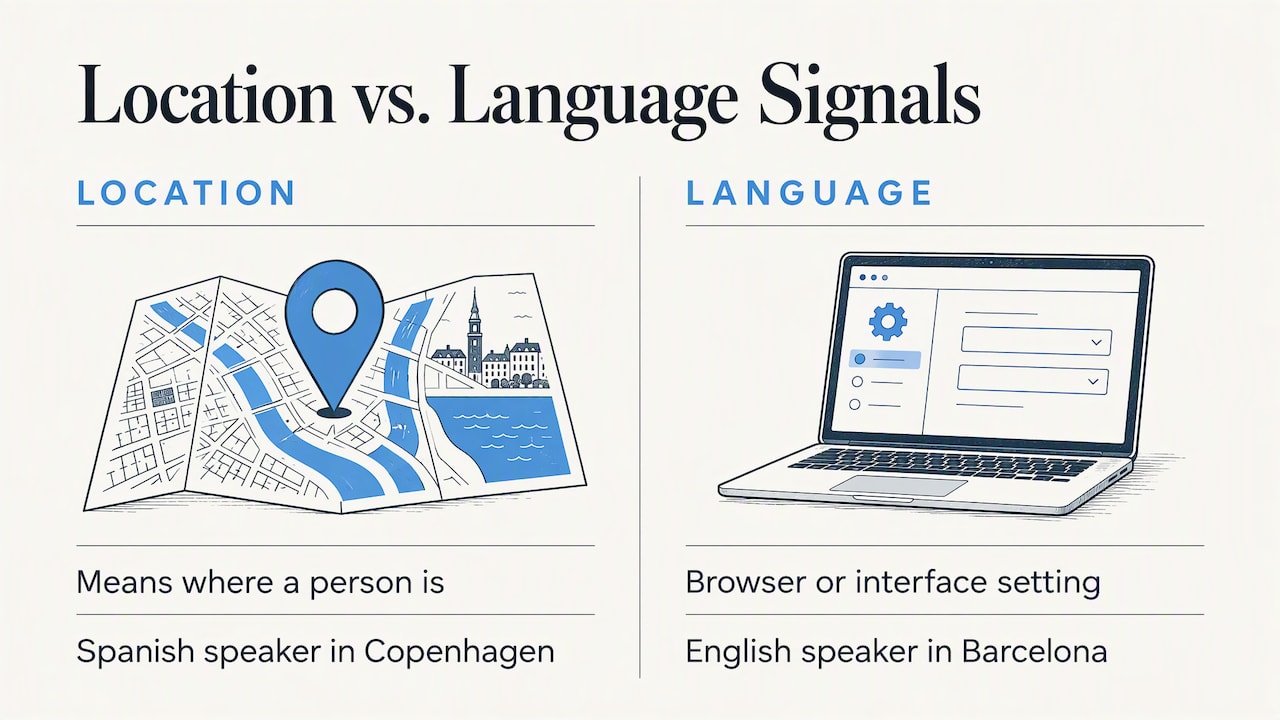
Location and language are different signals
A common slip: targeting a language when you meant a place, or the reverse. Language settings reflect the browser or interface language of a user, not where they live. A Spanish speaker in Copenhagen, or an English speaker in Barcelona, will see ads set for either signal depending on your configuration. Decide which you need, and keep campaigns separate when the message differs.
Align the landing page with the target
Every geo-targeted ad should land on a page that matches the promise. That means local currency, local delivery and returns information, local contact details and the right language. For e-commerce, shipping cost and delivery time are often the deciding factors in a new country, so show them early.
Perspective: why targeting without brand fit fails
We work from Barcelona and Copenhagen, and we see the same pattern with brands entering a new country. The media plan is carefully built. The location settings are correct. Then the creative is the home-market campaign with translated words, and results disappoint.
Geo targeting answers one question: who should see this? It does not answer the harder one: what should they see, and will it feel like it was made for them? We treat the two as one job. Before a campaign goes live, we want the brand identity, tone of voice and visual language to make sense in the target culture. That is the strategic insight and cultural fluency we bring to a project, and it is why we like to start with identity and market entry strategy, then build campaigns on top.
A few things we would tell any team before they spend on location-based ads:
- Start narrow. One country or even one city teaches you more per dollar than ten countries at once.
- Judge results by region, not account average. A strong city can hide a weak one.
- Localize the offer, not just the language. Price points, bundles and trust cues change from place to place.
- Write down your exclusions. They are as strategic as your inclusions.
- Respect the user’s sense of privacy. If a targeting tactic would feel odd when explained out loud, rethink it.
Building bridges between a brand and a new audience is the heart of what we do. Targeting is the road. The brand has to be worth the trip.
— Jacob
A step-by-step setup checklist
Use this before launching any geo-targeted campaign.
- Define the business reason for geography. Is it a service area, a shipping zone, a market test or an event? The reason decides the method.
- Pick the unit. Country, region, city, postal code or radius. Use the broadest unit that still protects your budget.
- Set the location option. Presence for on-site services, Presence or interest for planned travel or relocation.
- Add exclusions. Remove places you cannot serve or where cost per lead is consistently poor.
- Match creative and landing page. Local language, currency, address or service area, and a clear next step.
- Check consent and sensitivity. Confirm data sources and avoid sensitive locations.
- Split reporting by location. Review conversions, cost per acquisition and search terms for each region, weekly at first.
- Adjust. Increase budget in places that convert. Pause or exclude places that do not. Test new creative in the second wave.
Common mistakes to avoid
- Using the default location option without thinking. It can bring in clicks from people who will never visit you.
- Targeting too many places on one budget. Spend gets spread thin and no market gets enough data to learn from.
- Mixing languages and locations in one campaign. You lose the ability to read results.
- Reusing home-market creative. Targeting reaches the audience. It does not make the message relevant.
- Ignoring local seasonality and holidays. A promotion timed for one calendar can miss another entirely.
- Overlooking privacy expectations. Very precise targeting without clear consent can harm trust and may bring regulatory attention.
Where MS Nordic fits
If you are expanding into a new market and want campaigns that feel local from the first impression, our Digital Presence & Campaigns service covers the creative and digital side of that work. We pair it with brand and identity work and market entry strategy for companies heading to Spain, the UK or the Nordics, so the audience you target meets a brand built for them. You can see examples in our advertising projects. Ready to plan your entry? Start a conversation.
FAQ
Is geotargeting legal?
In general, yes. Targeting by country, city or region is standard practice. Rules tighten when you use precise or sensitive location data. In the US, the FTC has taken enforcement action over undisclosed collection and sale of sensitive location data, and other countries have their own rules, so confirm the requirements for each market you target.
What is an example of geo targeting?
A dental clinic in Austin shows search ads only to people physically in Austin and nearby suburbs, with an exclusion for areas it does not serve. A footwear brand entering Spain runs Spanish-language ads for Madrid and Barcelona only, while testing a different message in the UK. In both cases, location decides who sees what.
Can Meta ads be geo-targeted?
Yes. Meta Ads Manager lets you show ads to people in selected countries, regions, cities or around a point. Because feed users are not actively searching, local relevance in the creative matters even more than on search platforms.
What is the difference between geotargeting and geofencing?
Geofencing draws a virtual boundary and triggers an ad when a device enters it, in real time. Geotargeting is broader and combines location with other signals, such as interests or behavior, to shape who sees which message. Many campaigns use both.
How small can a radius be in Google Ads?
The minimum radius is 1 km (0.62 miles), and Google says this is a privacy safeguard rather than a feature gap. To reach a more specific audience, combine the radius with scheduling, tailored copy and a location-specific landing page.
Sources
- Google Ads Help: location targeting settings
- Google Ads Help: radius targeting
- Meta: location targeting in Ads Manager
- ICO: how the rules apply to online advertising
- ICO: location data under PECR
- ICO: citizens’ jury final report
- Airship: geo-targeted marketing explainer
- El Toro: understanding geoframing
- Appier: Omio’s expansion across 21 markets
- AdFlint: radius targeting on Google and Meta
- North Country Growth: geographic targeting mistakes