
Shopify internationalisation means setting up one store to sell in several countries, each with its own currency, language, pricing and product range. In Shopify, you do most of it through Markets, then add translations and local content on top. This guide covers the setup, the currency rules that catch people out, the language and SEO settings, and the brand decisions that decide whether a translated store actually converts.
TL;DR
- Shopify Markets lets you sell to many countries from a single store, with currency, language, products and pricing set per market.
- Prices can display in local currencies, but payments are only charged in local currency if Shopify Payments or Adyen is your primary gateway.
- Published languages get their own URLs, and Shopify adds hreflang tags and sitemap entries for you.
- Translation is the start. Adapted content, local payment habits and a brand that fits the market do the converting.
- Check plan limits and shipping rates before activating a market, or customers cannot check out.
Table of Contents
- What Shopify internationalisation actually covers
- Setting up Shopify Markets, step by step
- Multiple currencies: what customers see and what they pay
- Building a multilingual store
- International SEO: making each market findable
- Localise beyond translation
- Plan limits and checks before you launch
- Our perspective: internationalisation is a brand project first
- How we can help
- FAQ
- Sources
What Shopify internationalisation actually covers
There are three layers, and it helps to keep them apart.
- Commerce settings. Which countries you sell to, in which currency, at what price, with which products and shipping rates.
- Language and technical settings. Translated content, language-specific URLs, hreflang and sitemaps.
- Market fit. Tone, imagery, offers, legal wording, payment methods and the brand itself.
Shopify handles the first two with built-in tools. The third is where most cross-border stores win or lose, and it is the layer no setting can complete for you.
Inside Shopify, a market is built from conditions and customisations. Conditions say who the market applies to: countries or regions for cross-border selling, company locations for B2B, retail locations or sales channels. Customisations say what those customers get: available products, pricing and theme changes.
That structure is useful because it lets you start small. A Danish brand entering Spain, or a UK brand opening up to the Nordics, can begin with one market and add others as demand appears.
Setting up Shopify Markets, step by step
The setup follows Shopify’s own process for creating and activating markets. Here is the order we would work in.
- Decide your first market. Pick one country or a tight group of countries with a shared language and currency. Spreading across ten countries on day one makes every later decision harder.
- Create the market. In Shopify admin, go to Markets and create a new one.
- Add conditions. Under Includes, select regions or sub-regions. Other market types, such as company locations, POS locations or sales channels, are added the same way.
- Configure shipping rates. Every country or region in the market needs rates before it can go live. This is the step people forget.
- Set currency, language and pricing. Choose how the market shows prices and which languages it offers.
- Activate. Change the status from Draft to Active.
An inactive market is a quiet failure. Customers in it cannot complete a purchase and instead get the backup region experience. If you launch a campaign into a country and sales are flat, check the market status first.
Once markets exist, you can edit, activate, deactivate or delete them. You can also use submarkets, which inherit a parent market’s settings, to create more targeted experiences inside an existing market. A submarket is a sensible way to test, for example, a different offer for one region of a country.
How customers reach the right market
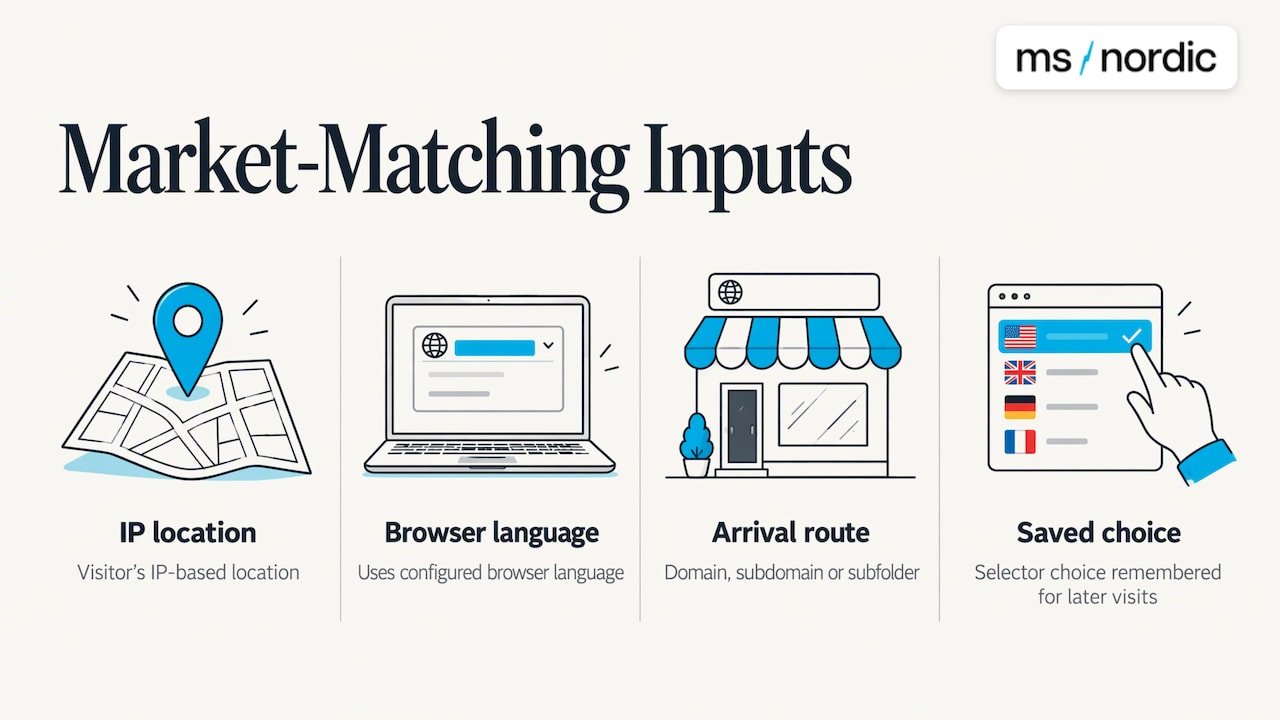
Shopify can match visitors to a market automatically. It uses the visitor’s IP-based location, their browser language (when you have several languages set up), the domain, subdomain or subfolder they arrive on, or a manual choice from a store selector that is remembered for later visits.
Our advice: do not rely on automatic detection alone. Travellers, VPN users and expats are all misread by IP. Offer a visible country and language selector so a customer in Madrid who prefers English, or a Dane working in London, can choose.
Multiple currencies: what customers see and what they pay
Shopify’s currency options cause more confusion than any other part of internationalisation. The key point is the difference between displaying a price and charging it.
According to Shopify’s markets overview, Markets can show prices in customers’ local currencies using automatic exchange rates. Payments are processed in local currency only when Shopify Payments or Adyen is the primary gateway. With another processor, checkout converts prices to your store’s default currency and charges in that currency.
| Your primary gateway | What the customer sees | What the customer is charged |
|---|---|---|
| Shopify Payments or Adyen | Local currency | Local currency |
| Another payment processor | Local currency (display only) | Store’s default currency |
The second row matters. A customer who sees a price in euros and is then charged in pounds may be surprised by their card statement, and surprises at checkout cost sales. If local-currency checkout is important to your launch, choose the gateway before you design the rest.
Discounts and exchange rates
Fixed amount discounts are created in your default currency and converted at checkout using current exchange rates. A fixed discount therefore does not equal the same round number in every market. If your promotion needs clean local figures, such as 10 off in euros, a percentage discount is simpler to communicate.
Pricing decisions beyond conversion
Automatic conversion gives you a correct price, not necessarily a good one. Before launch, ask:
- Does the converted price land on an awkward figure that looks unconsidered?
- Do local competitors price in a different band?
- Do shipping, duties and VAT change what a fair total looks like?
- Is your premium positioning visible enough to justify the price in this market?
These are brand questions as much as pricing ones, and they are where strategy earns its place.
Building a multilingual store
Language is the second pillar. Shopify’s guidance on localisation and translation works like this: you activate multiple languages in the admin, translated content is served on separate URLs, and when a customer lands on a regional URL Shopify shows the translated version if one exists. If it does not, it falls back to your primary language.
That fallback is worth knowing. A half-translated page is worse than a fully translated one, so audit what customers will actually see before you publish a language.
What to translate first
Work in order of the customer journey:
- Navigation, search and collection names
- Product titles, descriptions and variants
- Cart, checkout messaging and confirmation emails
- Shipping, returns and payment information
- Policies and legal pages
- Blog, help content and campaign landing pages
Translation can be done with Shopify’s Translate & Adapt app, a compatible third-party translation app or CSV import. Publishing a language creates language-code URLs, such as example.com/fr and example.com/de.
Check the requirements first
A multilingual store needs a plan that supports it (Basic or higher, according to Shopify’s documentation) and a compatible theme with a language selector. Confirm both in your admin before planning a translation budget.
International SEO: making each market findable
A translated store nobody can find does not sell. The useful news is that Shopify’s international SEO features handle many technical requirements for you. When you configure markets with domains, languages and localised content, Shopify generates hreflang tags and canonical URLs, builds sitemaps and keeps crawlers able to reach each version. Published languages are included in sitemaps.
For teams that manage custom templates or headless builds, automating hreflang in CI/CD is a useful way to keep annotations consistent as pages change.
Choosing a URL structure
The structure you choose affects how search engines read your store. Shopify’s guidance lists three options:
| Structure | Example | Setup effort | Local signal |
|---|---|---|---|
| Subfolder | example.com/es | Lowest | Shared with main domain |
| Subdomain | es.example.com | Medium | Moderate |
| Country-specific domain | example.es | Highest | Strongest, fully independent |
For most brands testing a first market, subfolders are the practical start. If a country becomes a core revenue source and you want a distinct local presence, a country domain is the long-term step. Make the decision early, because changing structure later means redirects and a period of re-ranking.
Localise the keywords, not just the words
Hreflang tells search engines which version is which. It does not choose your keywords. People in different countries search differently, so a literal translation of your English category terms often misses the phrase locals type. Research terms in each market, then write pages around them. Our own thinking on search visibility in the era of AI covers how this fits with wider discovery.
Localise beyond translation
Shopify’s international SEO guidance separates translated content from adapted content. Adapted content means market-specific product descriptions, promotional text or legal information that goes beyond a word-for-word translation. That distinction is the heart of good internationalisation.
What adaptation looks like in practice:
- Tone. Directness, humour and formality differ by market. A line that feels confident in one place feels pushy in another.
- Imagery. Models, settings, seasons and colours carry local meaning.
- Offers. Delivery promises, returns terms, payment methods and promotional calendars vary by country.
- Proof. Local reviews, local press and recognisable partners build trust faster than global claims.
- Legal copy. Consumer rights, privacy wording and returns language need to match the destination market.
Video is a strong format here, because the same product can be shown with local voices and context. If you plan to build social ads for each market, international expansion video content is one way to produce market-specific creative at pace.
The deeper question is whether your brand itself travels. Name, tagline, packaging language and visual cues can all land differently abroad. We cover that in our guide to adapting your brand for a new market, and for one specific route, our piece on Spanish market localisation explains why strategy should come before launch.
Plan limits and checks before you launch
Shopify’s requirements and considerations for markets include plan-specific limits. Customising themes per market requires Advanced or higher, and so does customising checkout and account pages per market. Some other customisations may require Plus.
For wholesale, B2B markets let you create customised experiences for company locations. On Basic, Grow and Advanced plans you can have up to three active catalogue assignments across active B2B markets. That limit does not apply on Shopify Plus. A B2B market also needs company locations assigned, otherwise it will not deliver B2B pricing or the B2B experience.
Pre-launch checklist
- Shipping rates configured for every country in the market
- Market status changed from Draft to Active
- Primary payment gateway chosen with local-currency checkout in mind
- Plan checked against the theme, checkout and B2B features you need
- Theme has a working language selector
- Every published language fully translated, with no mixed-language pages
- URL structure chosen and documented
- Country and language selector visible to customers
- Local legal pages, returns and delivery information reviewed
- Test orders placed from the target country’s perspective
Our perspective: internationalisation is a brand project first
Most teams treat Shopify internationalisation as a settings exercise. Turn on a market, add a currency, translate the product pages, done. The settings matter, and Shopify makes them far easier than they used to be. But a store can be technically perfect and still feel foreign to the people it is meant to serve.
We work between Barcelona and Copenhagen, and we see the same pattern with brands crossing borders. The questions that decide success are not in the admin panel. Does the name work here? Does the tone fit how people in this market buy? Does the price tell the right story? Are we showing the proof this audience trusts?
That is why we combine strategic insight, creative skill and cultural fluency in one process. We build the identity and the store together, so the localised experience is designed rather than patched in afterwards. Done this way, Shopify Markets becomes the delivery mechanism for a brand that already knows who it is talking to.
Our advice: before you configure market number two, write down what must stay constant about your brand and what should flex. Then let the store reflect it. Building bridges between markets starts there.
Jacob Munch
How we can help
If you are taking a brand into a new market, we can shape the whole route: brand localisation, market entry strategy, and an e-commerce build designed for the country you are entering. Our e-commerce service covers design and development, and you can see how that looks in practice in our Smukmund e-commerce project.
We work with founders and marketing teams who want a market-ready identity and a store that feels local from the first visit. Start a conversation through msnordic.com.
FAQ
Can I sell in multiple currencies on Shopify?
Yes. Markets can display prices in customers’ local currencies using automatic exchange rates. To charge in the local currency, Shopify Payments or Adyen must be your primary gateway. With another processor, prices display locally but checkout charges in your store’s default currency.
How do I set up Shopify Markets?
Go to Markets in your admin, create a market and add the countries or regions it includes. Configure shipping rates for every country in it, then change its status from Draft to Active. Until then, customers there cannot complete a purchase.
How do I make a Shopify store multilingual?
Activate additional languages in the admin, then translate your content with Translate & Adapt, a compatible translation app or CSV import. Each published language gets its own URL. You need a plan that supports multiple languages and a theme with a language selector.
Does Shopify handle hreflang tags?
Yes. When you configure markets with domains, languages and localised content, Shopify generates hreflang tags, canonical URLs and sitemaps automatically. You still need to choose a URL structure and write content that matches how local customers search.
Is translation enough to localise a store?
No. Translation converts words, while adapted content changes descriptions, promotions and legal information to suit the market. Local payment options, pricing, imagery and tone also shape whether visitors trust and buy. That is where brand localisation adds value.
Sources
- Shopify Help Center: Getting started with markets
- Shopify Help Center: Overview of markets features and concepts
- Shopify Help Center: Creating and activating markets
- Shopify Help Center: Setting up localization for markets
- Shopify Help Center: Localization and translation
- Shopify Help Center: International SEO for markets
- Shopify Help Center: Requirements and considerations for using markets
- Shopify Help Center: Managing B2B with Markets
- Automate hreflang in CI/CD
- International expansion video content