
Multi-currency pricing means showing and charging each customer in their own currency, with prices you have decided on rather than prices a converter happened to produce. Done well, it is a brand decision as much as a finance one: the number a Spanish or British shopper sees tells them whether you built the store for them. We design and build international e-commerce for brands entering new markets, and this is the routine we would hand a founder before a launch.
TL;DR
- Decide per market whether prices are converted automatically or set by hand. Automatic is quick; set prices give you control over margin and brand position.
- A converted price is not a local price. Check what shoppers in that country can afford, what competitors charge and what it costs you to serve them.
- Set a floor in local currency from your costs (support, payment fees, tax), never from the exchange rate.
- Rounding is part of the price. Pick an increment per currency and record it.
- Show the local currency on the product page, in the basket and in the final charge. Changing currency at checkout loses trust.
Table of Contents
- What multi-currency pricing actually is
- Three ways to set a local price
- A converted price is not yet a local price
- Build a price list with a floor and a ceiling
- Currency rounding rules
- Show one currency from first click to final charge
- Converted by the gateway, or set by you?
- Worked example: a Danish brand selling to Spain and the UK
- Where we come in
- Our perspective
- FAQ
- Sources
What multi-currency pricing actually is
A store that prices in multiple currencies displays product prices, takes payment and records transactions in more than one currency. It usually detects the visitor’s country, or lets them pick a currency, and relies on an exchange-rate source and a payment gateway that can process in that currency.
Three currencies are in play, and mixing them up causes most of the confusion:
- Store currency: the one your catalogue is built in.
- Presentment currency: what the customer sees and pays.
- Payout currency: what lands in your bank account.
Shopify’s documentation describes exactly this split between store, local and payout currency. The pricing question is how you get from the first to the second.
Three ways to set a local price
There are three approaches, and most brands end up combining them by market.
Automatic conversion
The platform multiplies your base price by the exchange rate, adds a conversion fee, then applies rounding. Shopify’s worked example takes a $10.00 product at a rate of 0.867519 with a 1.5% fee: the result is €8.81, rounded up to €8.85 when rounding rules are active. This is fast and needs no maintenance. The trade-off is that the price moves with the market, and you rarely land on a number that suits the shelf.
Fixed rate
You set your own rate and keep it for a period. Shopify lets you set a manual rate per market to stabilise prices, and if you want the fee included you multiply the rate by it: 0.90867 with a 1.5% fee becomes 0.9223. WooCommerce’s currency switcher offers the same choice: a manual rate (a 0.90 rate turns a $100 product into £90) or rates fetched on a schedule, every 12 hours, daily or weekly.
A fixed rate suits brands that want stable prices for customers and a regular review for themselves, say quarterly.
Hand-set prices per market
You write the price for each country. BigCommerce notes that manual pricing lets merchants dictate pricing item by item, while automatic pricing simply converts. This is the most work and the most control, and it is where brand positioning shows. A premium Danish brand that wants to read as premium in Spain will not let an algorithm decide that.
A price set by hand is also an exchange-rate commitment. Stripe’s documentation lists manual currency prices as static prices where the merchant absorbs the exchange-rate risk. Plan for that in your margin.
A converted price is not yet a local price
Two shoppers can see the same converted figure and perceive it very differently. Linguise argues that currency localisation should weigh purchasing power, competitor pricing and willingness to pay, not only the exchange rate. Stripe’s guidance on geographic pricing points the same way, advising you to assess demand, local competitors, average income, price expectations and cost to serve for each target market.
For a brand entering a market, that translates into four questions:
- Who are the local alternatives, and what do they charge?
- Where does the product sit in the category: entry, core or premium?
- Does the price tell the same story as the brand, the language and the photography?
- Will the price still cover your costs in that market?
The last two are why pricing belongs next to brand localisation. A price is part of the identity a market meets.
Build a price list with a floor and a ceiling
A workable method comes from CurrencyCore’s local-pricing guide for software plans, and it translates to physical and digital goods alike. The sequence is: start from the base price, adjust for local purchasing power, multiply to a raw local price, apply a floor and ceiling in local currency, round to a presentable price, and record the inputs. If the raw value falls below the floor, charge the floor; if it exceeds the ceiling, charge the ceiling.
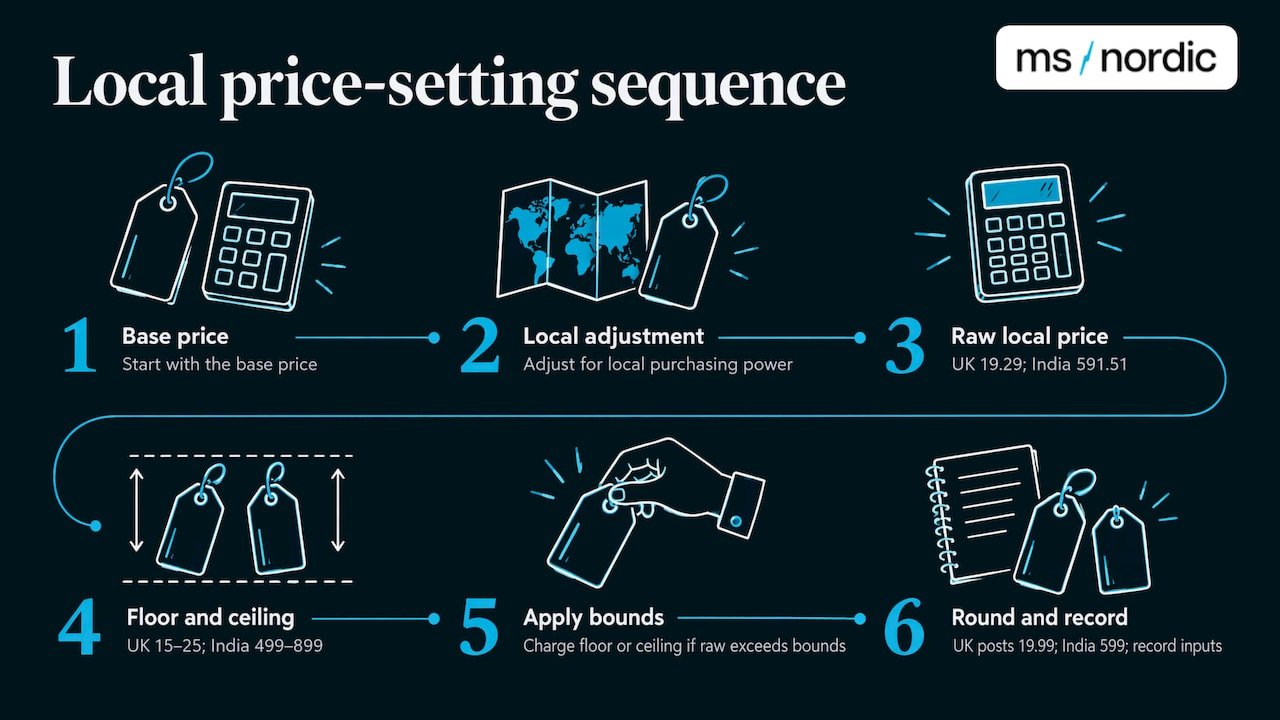
Their UK example: a raw price of 19.29 with a floor of 15 and a ceiling of 25 posts at 19.99. Their India example: raw 591.51, floor 499, ceiling 899, posted at 599.
How to set the floor
The floor is the lowest price that still covers support, payment fees and tax in that market. The same guide is explicit that it comes from cost to serve and never from the market exchange rate. If the pound weakens, your floor does not move; your decision about whether to stay in the market might.
Tiers
If you sell several product lines, you can use price corridors against a baseline. One template suggests a premium tier at 90 to 110% of baseline, a core tier at 60 to 80% and a value tier at 35 to 55%, with a minimum price and a maximum discount. Treat these as a starting grid, then test them against what you find in the market.
Keep a record
For every market, note the base price, the rate or factor used, the date, the raw price and the posted price. When someone asks in a year why a jacket costs €129 in Madrid, you can answer in one line.
Currency rounding rules
Rounding decides whether €8.81 appears as €8.81, €8.85 or €9. Platforms apply it after conversion, and it affects both margin and how the price feels. Shopify applies the rule for each currency after the rate and fee, so the merchant’s payout from a multi-currency order stays similar to a store-currency order.
WooCommerce shows how much the increment matters. A converted price of 87.32 becomes 87.25 or 87.50 at 0.25 rounding, 87.50 at 0.50, 87 or 88 at whole numbers, and 90 at rounding to 10. The same product ends up at four different prices depending on one setting.
Practical rules we apply:
- Choose the increment per currency, not once for the store. Euro prices often suit .95 or .99 endings, while a kroner price is more natural in whole numbers.
- Round in the direction you can afford. Rounding down costs margin on every order.
- Keep the ending consistent across the catalogue so the store feels like one voice.
- Check the arithmetic for your own margin after rounding, not before.
Price display rules in Great Britain
If you sell in Britain, the government’s guidance on the Price Marking Order 2004, including amendments in effect from 6 April 2026, sets out how unit prices are expressed. Below £1, a unit price is shown to the nearest 0.1p, rounding up at a digit of 5 or higher and down at 4 or lower. Above £1, it may be shown to the nearest 1p or 0.1p under the same rule. Online, prices must be unambiguous, clearly legible and shown close to the product or its description. Check the guidance for your product category before launch.
Show one currency from first click to final charge
Stripe advises displaying prices and charging in the shopper’s local currency throughout the purchase flow, including the final charge, because foreign-currency amounts force mental conversion and raise worries about hidden fees. BigCommerce makes the same point: showing prices in one currency and switching to the local one only at checkout defeats the purpose.
In practice that means:
- the currency on category pages, product pages, basket, confirmation email and card statement is the same;
- the selector is visible and remembers the choice;
- shipping and tax lines are shown in that currency too;
- the payment methods on offer suit the market, which we cover in our guide to choosing international payment methods market by market.
Every market version of a store also multiplies the pages you must keep healthy. Redirects, duplicate content and tags need checking across versions, and international site audits help you keep each version clean as the catalogue grows.
Converted by the gateway, or set by you?
With dynamic currency conversion, the amount is converted to the cardholder’s billing currency and the transaction is submitted in that currency, typically with a fee or markup disclosed before the cardholder chooses. With merchant-set multi-currency pricing, the shopper sees their domestic currency while settlement and reporting stay in your chosen currency.
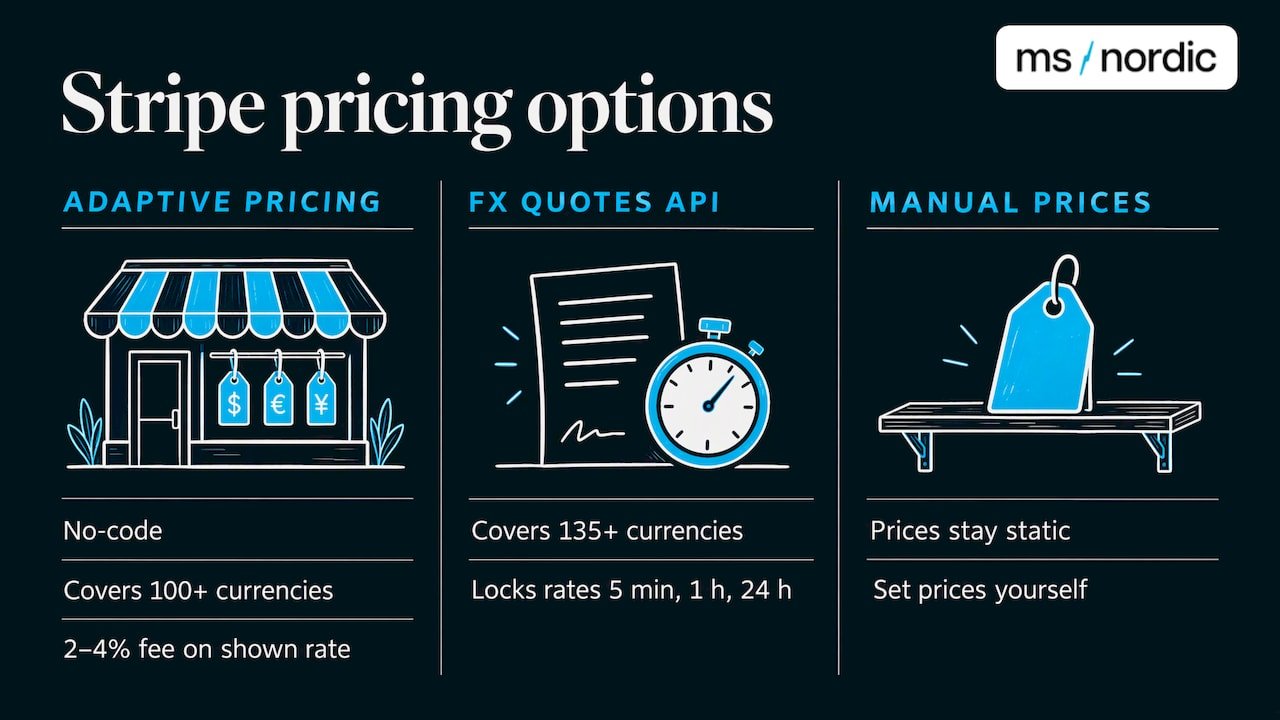
Stripe’s documentation shows how the options differ in practice. Adaptive Pricing is no-code, covers 100+ currencies and applies a 2 to 4% conversion fee to the rate shown to customers. The FX Quotes API covers 135+ currencies and locks rates for 5 minutes, 1 hour or 24 hours. Manual prices stay static. Choose by how much control you want over the number the shopper sees. If brand positioning matters, which it does for a market entry, set prices yourself and let the gateway only process them.
Worked example: a Danish brand selling to Spain and the UK
A Danish homeware brand sells a throw at 899 kr. in its home store. Here is the routine, with illustrative numbers (check live rates and your own costs):
- Base: 899 kr. is the reference list price.
- Raw conversion: use a period-average rate, not a single day’s quote, and record it.
- Local check: compare with three comparable Spanish and British products. Decide on the position: core, not entry.
- Floor: add support, payment fees and VAT-related costs in euros and pounds. If the converted price falls under that, post the floor.
- Round: a €.95 ending in euros, a £.99 ending in sterling.
- Display: show €/£ from product page to card statement, with VAT-inclusive prices where your market expects them.
- Review: revisit quarterly. Change a list price only when the movement is sustained, because customers read a rate-driven change as a price rise.
That last point is the one finance teams miss: repricing is a customer-facing event, not a back-office adjustment.
Where we come in
Pricing is one layer of a launch that also includes language, identity, payment methods and store build. Our e-commerce service covers e-commerce development alongside branding, market entry strategy and localisation for businesses entering new markets, and our guide to Shopify internationalisation shows how markets and currencies fit into a store. For a Danish brand going to Spain, our piece on Spanish market localisation covers what to decide before launch.
If you are planning a market entry and want the price list, the store and the brand to say the same thing, see our services and start a conversation.

Our perspective
We see multi-currency pricing as building bridges. A shopper in Madrid or Manchester should feel that the store was made for them, and the price is the first sentence of that message.
That is why we treat pricing as part of brand localisation, not as a plug-in setting. Strategic insight tells us where a product should sit in a market. Cultural fluency tells us how that position is read. Design and development turn both into a store where the currency, the rounding, the wording and the payment options agree with each other.
Our advice to founders is simple: decide your price positions market by market, document the reasoning, and build the store so it can carry them. Automation then serves your strategy, rather than quietly writing it.
Jacob Munch
FAQ
Should I convert prices automatically or set them by hand?
Automatic conversion is the fastest start and suits a test market. Hand-set prices suit markets where positioning and margin matter, because you decide the number rather than inheriting it from a rate. Many brands start automatic, then move their main markets to set prices once they see demand.
How often should I update local prices?
On a schedule, not with every rate movement. A quarterly review is a sensible rhythm, changing a price only when the shift is sustained. Customers read a change in a live price as an increase, whatever the arithmetic says.
What are the currency rounding rules I should follow?
For display of unit prices in Great Britain, the Price Marking Order guidance sets rounding to the nearest 0.1p or 1p, rounding up at 5 or above. For your own price endings there is no single rule: pick an increment per currency, such as 0.25, 0.50 or whole numbers, and apply it consistently.
Should checkout show the local currency too?
Yes. Show the same currency on the product page, in the basket and on the final charge. Switching at checkout makes shoppers recalculate and wonder about fees.
Sources
- ConnectPay: Multi-Currency Ecommerce in 2026
- Shopify Help Center: Currency conversions and exchange rates
- WooCommerce: Currency Switcher documentation
- BigCommerce: Multi-Currency Ecommerce
- Linguise: Currency localization vs. currency conversion
- Stripe: How to use geographic pricing
- CurrencyCore: Local Pricing for SaaS Plans
- Worldwide Pricing: Country-Based Price List Template
- Shopify: Multi Currency Shopify
- UK Government: The Price Marking Order 2004 guidance
- Stripe: Local payments, a payment localization guide
- Visa: Optimize Your Cross-Border Ecommerce Payment Acceptance
- Stripe Documentation: Localize prices